Windows Install Guide
Two steps to bypass the SmartScreen warning
After downloading the AIHEY installer, Windows may show a blue SmartScreen warning. This isn't malware — it's Windows' default behavior for newly released apps that haven't purchased a commercial code-signing certificate. Follow the two steps below to install normally.
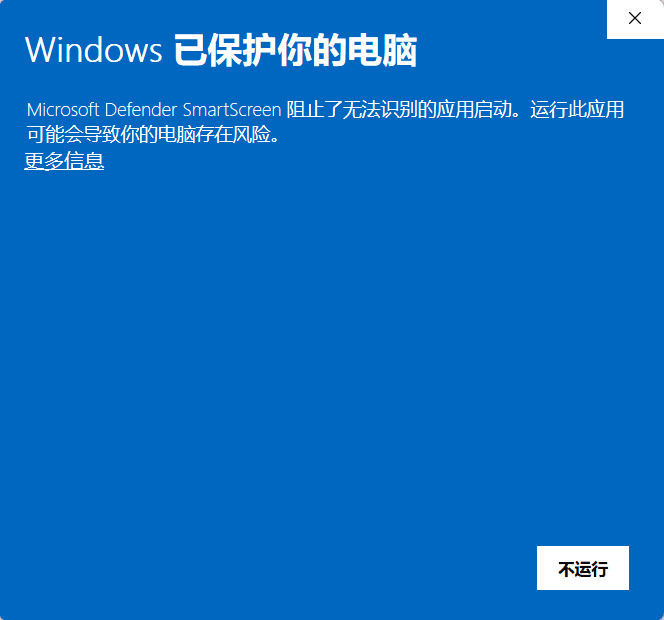
Step 1: Click "More info"
When you see the "Windows protected your PC" blue dialog, do NOT click "Don't run". Click the "More info" link at the bottom-left to expand details.
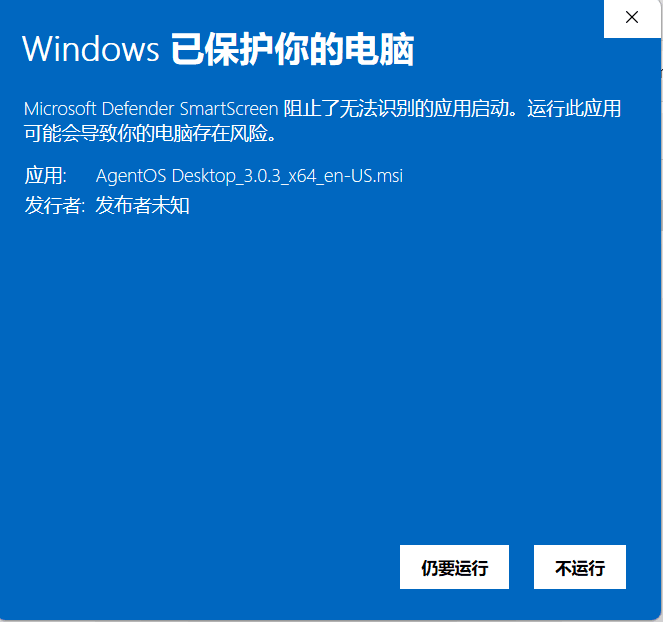
Step 2: Click "Run anyway"
After expanding, a "Run anyway" button appears. Click it to start installing AIHEY.
Why does this warning appear?
Windows SmartScreen is Microsoft's anti-phishing/malware mechanism. For newly released apps that haven't purchased a commercial code-signing certificate, Windows shows this warning out of caution — even if the file itself is completely safe.
AIHEY hasn't purchased a commercial code-signing certificate yet. We secure downloads through:
- •Installers are only distributed via the official site (www.tybbtech.com), never third-party download portals
- •Source code is hosted in a public GitHub repository (tiantianlaolao/agentos) — open and auditable
- •As the official site accumulates more downloads, SmartScreen will gradually recognize the app as trusted and the warning will disappear automatically